


To set up a canister filter, begin by unpacking the unit and verifying all components, including hoses and adapters. Next, install filter media in layers: start with coarse mechanical media, add biological media, then fine chemical media. Connect inlet and outlet hoses, ensuring secure fittings. Prime the filter by opening stopcocks and allowing water to flow without air bubbles. Perform routine maintenance every 1-2 months to keep water quality high. Continue for more detailed tips and troubleshooting advice.
Key Takeaways
- Carefully unpack the filter, ensuring all key components like hoses and adapters are included and organized for setup.
- Install filter media in layers: coarse mechanical, biological, and fine chemical, following the manufacturer’s instructions.
- Connect the inlet and outlet hoses securely, ensuring the inlet is submerged and hoses are softened for easy attachment.
- Prime the filter by filling the aquarium with water and initiating water flow, monitoring for air bubbles during the process.
- Perform routine maintenance every 1-2 months and a thorough cleaning every 4-6 months to maintain optimal performance.
Unpacking the Filter and Preparing for Setup

When unpacking the canister filter, it is important to approach the task with care to guarantee that all components remain intact and ready for use. First, gently open the packaging, revealing the main unit and accessories. Confirm the presence of key components, such as hoses and adapters, which are essential for installation. Check if the rubber feet are pre-installed; these help minimize noise and vibrations during operation. Next, organize these components to simplify the setup process. Always reference the manufacturer’s manual for specific instructions regarding filter media placement in the baskets. This step is critical for achieving peak functionality. Finally, confirm all necessary components are connected, preparing the canister filter for efficient operation before beginning the installation phase. Many canister filters feature adjustable flow rates, allowing for enhanced compatibility with varying tank sizes.
Installing Filter Media and Baskets

With the canister filter unpacked and components organized, the next step involves installing the filter media and baskets. First, inspect the canister’s internal structure and remove any protective packaging from the filter media. Rinse new filter media with clear water to clear dust that could compromise water quality. Layer the filter media correctly; begin with coarse mechanical media at the bottom, followed by biological filter media, and top with fine chemical media for ideal water flow. Securely stack the filter baskets within the canister, ensuring efficient pump operation and preventing blockages. Energy-efficient motors in many models ensure strong water circulation while reducing operational costs. After arranging the media, double-check that the hose adapter is properly aligned and secured to avoid leaks, which is essential for filter maintenance and effective filtration of aquarium water.
Connecting Hoses for Inlet and Outlet
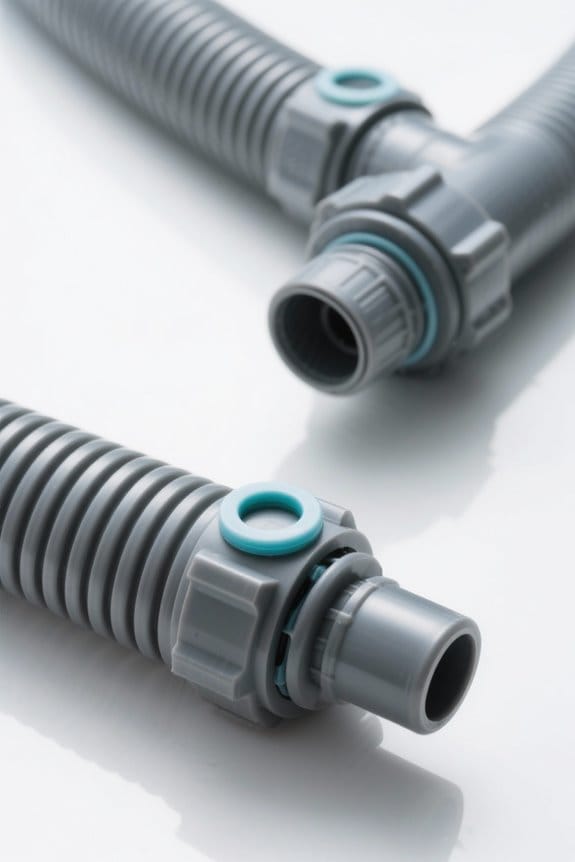
To establish a seamless water flow in the canister filter, connecting the inlet and outlet hoses correctly is essential. Begin by identifying the inlet hose, which draws water from the aquarium, and the outlet hose, which returns filtered water. Submerge the inlet hose fully to prevent air from entering the system, avoiding noise or reduced flow. To facilitate attachment, use warm water to soften the hoses, ensuring a snug fit at the filter’s fittings to prevent leaks. When connecting hoses, secure the glassware or fittings to avoid breakage under pressure. Once connected, double-check their alignment for peak water flow and accessibility, keeping these maintenance tips in mind for efficient operation of your tank filter and various filter types. A multi-stage filtration system enhances water clarity and cleanliness, as seen in products like the Marineland Penguin Bio-Wheel Power Filter.
Priming the Canister Filter

Priming the canister filter guarantees that it operates efficiently by eliminating trapped air and allowing water to flow freely. Begin by ensuring that the aquarium is filled with water, and check that the stopcock(s) on the filter head are opened with the inlet submerged. To initiate water flow, either suck gently at the outflow hose or wait for gravity to draw the water in after opening the filter valve. Monitor the process closely, watching for air bubbles. Once water is flowing steadily through the canister filter, confirm it is fully filled before connecting power. Regularly performing this priming step during maintenance and cleaning is essential to avoid air locks in the filter system, which can disrupt filtration and reduce efficiency. It’s important to consider the flow rate capabilities of your specific canister filter model to ensure optimal water circulation and filtration within your aquarium.
Routine Maintenance and Cleaning Tips

Routine maintenance of a canister filter guarantees it operates efficiently and helps maintain perfect water quality in the aquarium. Perform routine maintenance every 1-2 months, and conduct thorough cleaning every 4-6 months. When rinsing filter media, always use aquarium water to preserve beneficial bacteria essential for biological filtration, avoiding tap water that can disrupt this process. For effective waste removal, wash coarse and fine filter sponges in a bucket of aquarium water. Additionally, remember to perform impeller cleaning every six months using a toothbrush, preventing buildup that impairs water flow. Monitor water quality by testing for ammonia and nitrite levels. Consider using liquid reagent kits for more accurate water quality testing results. Adjust the cleaning frequency based on the aquarium’s biological load and observed waste accumulation for ideal performance.
Troubleshooting Common Issues
When facing issues with a canister filter, it is crucial to identify and resolve the problem efficiently to maintain an ideal environment for aquarium inhabitants. Begin troubleshooting by inspecting for air locks, which can greatly reduce water flow; verify the filter is fully filled and the valve is open. Check for clogged filter media, as excessive waste can hinder performance; regularly clean or replace filter pads every 2-4 weeks based on tank stocking levels. If noise is present, it typically indicates trapped air; thorough cleaning and proper priming can remedy this. Finally, perform frequent water quality testing, focusing on ammonia and nitrite levels, to confirm the filter’s chemical filtration efficacy and support a healthy aquatic environment. Regular cleaning of filter media like the Aquarium Bio Balls is essential for optimal performance, enhancing both mechanical and biological filtration.
Frequently Asked Questions
How Do You Prime a New Canister Filter?
Priming a new canister filter involves ensuring proper water flow adjustment by submerging hoses, avoiding common filter issues, and conducting water quality testing before activation. Regular canister filter maintenance and timely media replacement enhance efficiency and reduce noise.
What Is the Best Order for Media in a Canister Filter?
The ideal media order in a canister filter is mechanical, biological, then chemical. This arrangement maximizes filter efficiency, enhances water clarity, guarantees algae control, supports biological filtration, and facilitates easy filter maintenance and timely media replacement for peak aquarium health.
How Long Should I Let My Filter Run Before Adding Fish?
It is advisable to run the filter for 24 to 48 hours prior to initial fish introduction. This allows for beneficial bacteria development, water quality testing, and evaluation of standby filtration options while following canister maintenance tips and brand recommendations.
How to Arrange Filter Media in Canister Filter?
In the intricate dance of filtration, layering begins with coarse filter media for debris, followed by finer sizes, biological media for beneficial bacteria, and ends with activated carbon; each type enhancing water clarity and health through compatibility.


